A Complete Step-by-Step Guide to Get More Leads & Grow Your Business
If you are a construction material seller or contractor registered on URSBID, your profile is your digital showroom. A well-managed profile increases visibility, builds trust and helps you receive genuine enquiries from nearby buyers.
In this guide, we’ll explain how to manage your Seller/Contractor profile on URSBID step-by-step — exactly as shown in the dashboard process.
Why is Profile Management Important?
Your profile is the front door to your business, so managing it well can help grow your business. Your URSBID profile helps you:
- Appear in relevant buyer searches
- Get enquiries from your service area
- Showcase your products & services
- Build trust with verified buyers
- Increase bid win chances
Let’s understand how to manage it properly.
Step-by-Step Guide to Manage Your Profile on URSBID
Step 1: Login to Your Account Dashboard
First, log in to your URSBID Seller/Contractor Account.
After login, you will land on your Account Dashboard, where you can see profile details, enquiries, and settings.
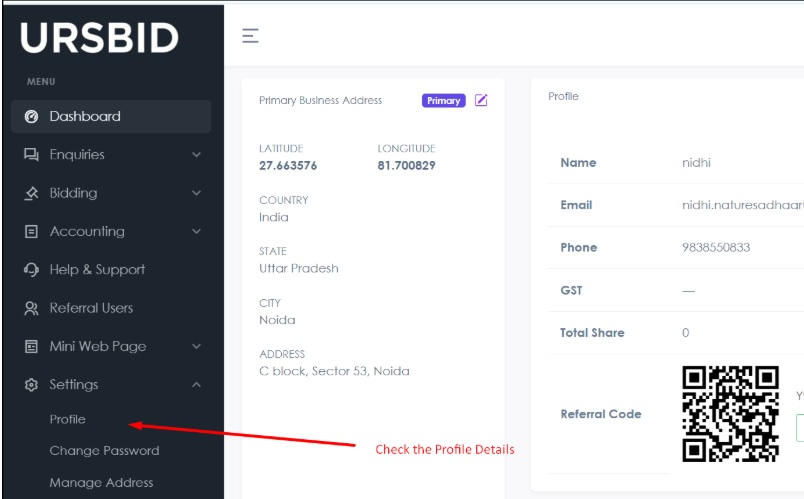
👉 Always make sure you are using the correct registered mobile number/email.
Step 2: Check Your Complete Profile Dashboard
Carefully review:
- Business Name
- Contact Details
- Products/Services Listed
- Address Information
- About Us Section
Make sure everything is accurate and updated.
A complete profile = More buyer trust + More enquiries.
Step 3: Make Corrections or Upgrade Your Profile
If you find any errors or want to upgrade your listing:
Go to:
Setting → Profile
Here you can:
- Edit business details
- Update contact information
- Select products you deal in
- Select services you provide
- Upgrade your profile if required
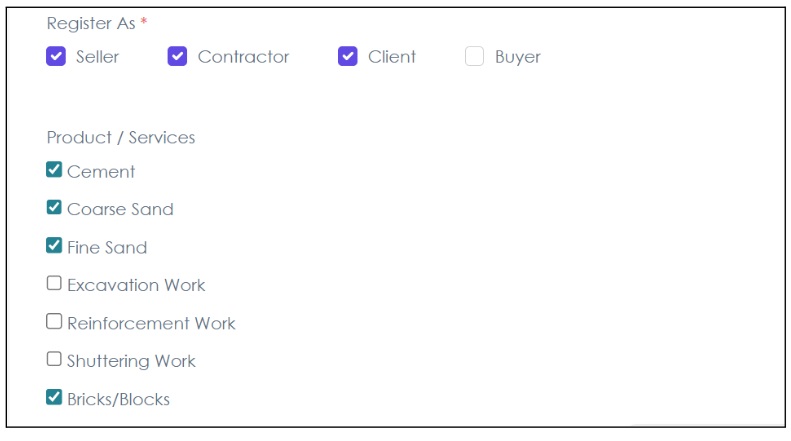
📌 Important: Always select correct product categories and services. This helps buyers find you easily.
Step 4: Save All Changes
After making corrections:
✔ Click on Save Changes
Without saving, updates will not reflect on your profile.
Make sure every update is saved properly before exiting.
Step 5: Manage Your Address to Get Local Leads
To receive enquiries from your nearby area, you must manage your address properly.
Go to:
Setting → Manage Address → Add New
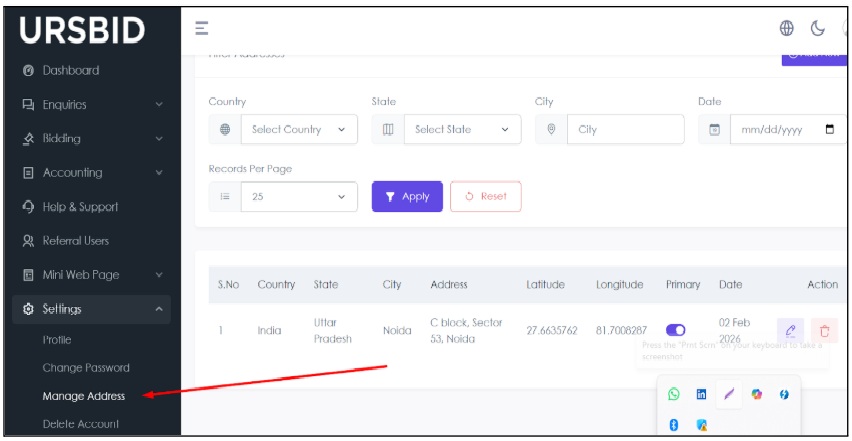
Here you can:
- Add multiple addresses (if you operate in different locations)
- Set your Primary Address
- Define the area where you sell products or provide services
📍 Tip: If you supply materials in multiple districts or cities, add all service areas to increase lead opportunities.
Step 6: Manage Your Mini Web Page
URSBID provides you with a Personalized Mini Web Page.
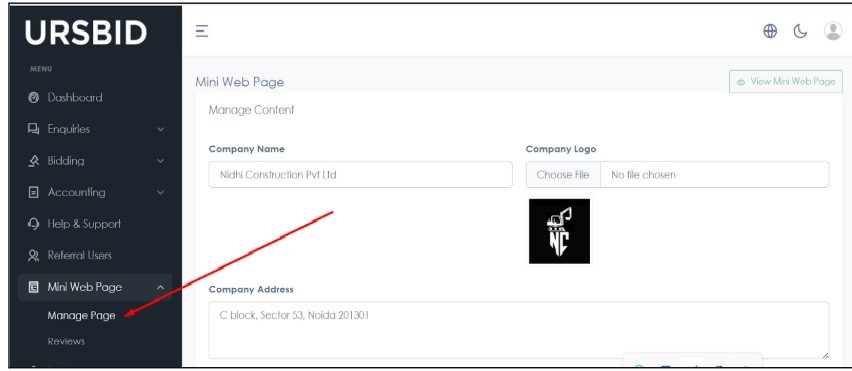
This works like your digital business profile.
Here you can:
- Add Product Catalogue
- Add Service Details
- Write “About Us”
- Upload images of your work/material
- Share your URSBID page link with buyers
You can use this page for:
- WhatsApp sharing
- Advertisement promotion
- Social media marketing
A well-designed mini webpage increases credibility and conversion rate.
Step 7: Start Bidding on Active Enquiries
Once your profile is fully updated:
Go to:
Enquiry → Active Enquiry
- Check buyer requirements
- Select relevant enquiry
- Place your bid
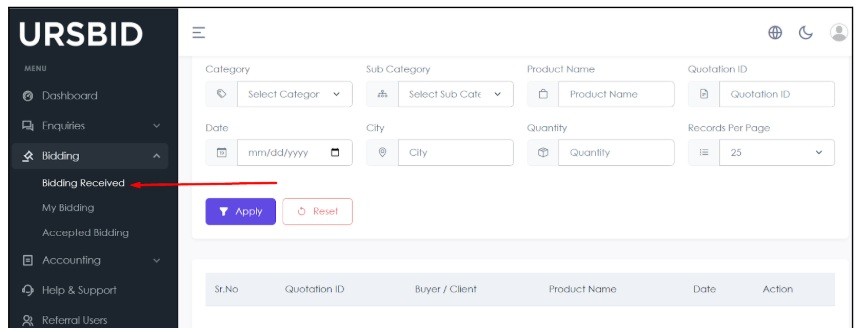
Bidding on relevant enquiries helps you:
- Get genuine leads
- Close more deals
- Grow your business
💡 Pro Tip: Bid quickly. Early responses increase chances of selection.
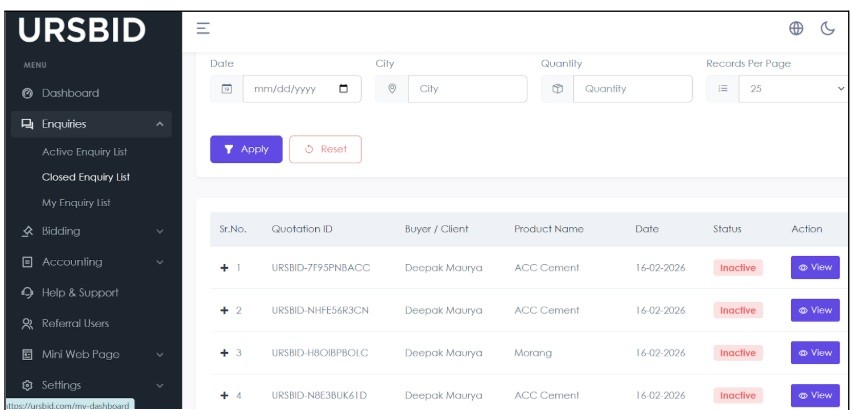
Best Practices to Get Maximum Leads on URSBID
Simply registering on URSBID is not enough. If you want consistent and high-quality leads, you must actively manage and optimize your profile. Following the best practices below will improve your visibility, build buyer trust, and increase your chances of winning more enquiries.
- Keep your profile 100% complete
- Add real images of products/services
- Update your service areas
- Respond quickly to enquiries
- Maintain professional communication
Final Words
Your URSBID profile is not just an account — it is your digital business identity in the construction market. It represents your brand, your credibility, and your professionalism to every potential buyer who visits your page.
When you properly manage and regularly update:
- Profile Details
- Business Address & Service Areas
- Product & Service Listings
- Mini Web Page
- Active Enquiries & Bids
You significantly increase your chances of receiving consistent, high-quality, and relevant leads.
Remember, buyers prefer sellers and contractors who maintain complete, updated, and professional profiles. A well-optimized profile not only brings more enquiries but also helps you close more deals.
Start optimizing your Seller/Contractor profile today and take your construction business to the next level with URSBID